This guide helps managers explore the Immersive platform after registration, starting with the Manager Quickstart dashboard for streamlined onboarding. Learn about key features including the Launchpad for quick access, navigation bar tools (Reports, Exercise, Upskill, MITRE ATT&CK, and Manage), and essential settings for content creation and team management. The guide covers language support, search, notifications, profile settings, and the various content catalogs covering cybersecurity training, crisis simulations, cyber ranges, workforce exercises, operational technology, and career paths.
Manager Quickstart Dashboard
After you've finished registering your account, the Manager Quickstart dashboard is your starting point for efficiently onboarding your team and rolling out your content program.
The Manager Quickstart feature provides managers with a streamlined and efficient interface that guides you through the essential tasks needed to set up accounts for your team, assign relevant labs and learning paths, and monitor their progress and performance.
What you can do with Manager Quickstart
The Manager Quickstart dashboard is organized into two key areas to help you get started quickly:
1. Assignments Group
Use this section to prepare and distribute content to your team:
- Assign lab collections and career paths - Easily distribute curated learning content to your team members
- Manage content assignments - Track and modify assignments you've created, view progress, and adjust deadlines
- Assigned to me - Keep track of your own development path by viewing activities assigned to you
Pro Tip: Having labs ready for your team before they complete registration increases engagement during deployment. Consider preparing initial assignments before sending invitations.
2. Configure Organization Group
Use this section to set up your platform and team structure:
- Managing teams - Create and organize team hierarchies that reflect your organizational structure
- Inviting users - Add team members individually or in bulk via CSV import
- Updating platform settings - Configure email notifications, branding, permissions, and other organizational settings
The Manager Quickstart dashboard is accessible from the Launchpad and provides quick links to the most important tasks you'll need to complete during your initial setup and ongoing management.
Take a platform demo
Before diving into configuration, we recommend taking a guided tour of the platform. The following interactive demo provides an overview of the Immersive platform and highlights the key features you can explore.
Check your settings & profile
Before rolling out the platform to your team, complete these essential setup tasks:
- Update your profile: Check your settings to ensure that your Immersive One profile is correct. More accurate information enables us to tailor your Immersive experience to your needs.
- Review system requirements: Familiarize yourself with our network and system requirements for an optimal user experience. Share these with your IT team if necessary.
- Understand roles and permissions: Review how roles and permissions work to ensure your team members have access to everything they need for a smooth launch.
- Learn about the Immersive Resilience Score: Understand the Immersive resilience score to better measure your organization's cybersecurity capabilities.
Using the Launchpad
The Launchpad is your "quick links" hub - a fast and easy way to access the most frequently used features of the Immersive platform.
To access the Launchpad: In the upper-left corner of the navigation bar, click Launchpad.
Manager Quickstart section
The Manager Quickstart section of the Launchpad provides two essential groups:
- Assignments group: Easily assign lab collections and career paths and manage content assignments for your team. Having labs ready for your team increases engagement during deployment. You can also track your own development by clicking the Assigned to me button.
- Configure organization group: Quickly complete essential tasks such as managing teams, inviting users, and updating platform settings.
Leaderboard section
The Leaderboard section of the Launchpad displays:
- Points and rankings: View points earned by you and your team as you complete labs and assignments, showing progress and encouraging friendly competition.
- Achievements: As you prove your skills, unlock exciting achievements within the platform and climb the Leaderboard.
- Streaks: Track your personal streaks and click Streak settings to change your goals to suit your personal learning style.
- Recent Activity: View labs that you recently completed or started, allowing you to easily resume paused labs.
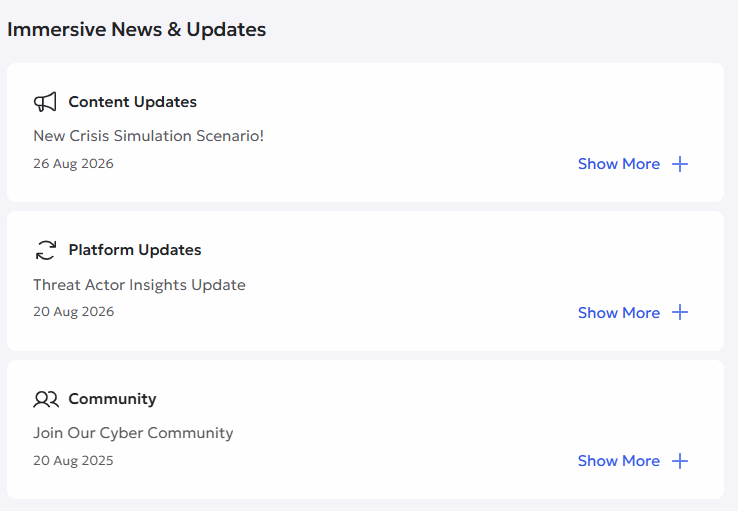
Immersive news & updates
The Immersive News & Updates section helps you stay current with the latest content releases, new features, and platform updates.
Exploring the navigation bar
The navigation bar provides quick access to all major platform sections and tools.
Reports
Click Reports on the navigation bar to view statistics and data for your team and users.
- Resilience Score: Understand and quantity your organization's cyber resilience. Measure readiness, identify risks, and enhance defense strategies.
- Platform activity: Compare activity by individuals and teams, review progress and completion of assigned collections, and download CSV reports.
- Capability by area: Investigate and compare teams within your organization across different cybersecurity domains.
- Metrics Tracker: Track changes in key metrics over time and compare against industry benchmarks.
- Threat Actor Insights: Track MITRE threat actors and measure your team's readiness against their techniques.
- Data Explorer: Configure custom datasets and download them in CSV format for deeper analysis.
Exercise
Click Exercise to challenge your team with hands-on technical and business exercises. By engaging with these exercises, you and your organization can understand your strengths and weaknesses regarding cyber knowledge, skills, and judgment.
Technical exercises:
- Challenges and Scenarios: Dive into practical cybersecurity scenarios suitable for all levels of expertise to enhance problem-solving skills.
- Cyber Threat Intelligence: Our experts turn the latest threat intelligence feeds, vulnerability research and security blogs into hands on labs.
- Dynamic Threat Range: Empower your security teams with real-time, comprehensive cyber attack-chain simulations via cyber
- Cyber Range Exercises: Exercise your cybersecurity teams in realistic, complex environments.
- Cyber Ranges: Use realistic and customizable environments to detect and mitigate cyber attacks and test new tools.
Business Exercises:
- Crisis Simulations: Engage with simulated crisis scenarios based on real-world cyber attacks and security incidents.
- Workforce Exercises: Build resilience across your entire organization by exercising everyone on key security risks.
Featured:
- Agent Tuning: Configure, stress-test. and refine AI agents in sandboxed environments with complete token spend and guardrail visibility.
- Offensive AI Ranges: Controlled scenarios where teams use agentic AI to exploit vulnerabilities just like a real adversary.
- Developer AI Ranges: Build practical AI skills, reduce AI risk and prepare for AI-powered threats.
Upskill
Click Upskill to access upskilling growth content and boost your team's skills. Explore collections of labs designed to help your team grow and develop, including career paths and collection categories mapped to the NIST NICE framework.
- Career Paths: Industry-aligned career paths from penetration testing to threat hunting with hands-on labs.
- Offensive Cyber: Hands-on offensive practical labs for penetration testers, ethical hackers, and blue teamers.
- Fundamentals: Ideal for beginners to understand basic cybersecurity concepts and master essential skills.
- Application Security: Empower secure developer mindsets with labs covering the entire software development lifecycle.
- Defensive Cyber: Hands-on practical labs for defenders and blue teamers.
- Cloud Security: Complete labs in real cloud environments, covering Terraform to Kubernetes.
- Operation Technology: Secure operational technology using controls that align with operational reality.
You can also view your progress, including accessing the Leaderboard, your achievements, and recommended activities.
Frameworks
The following frameworks will help you understand your team's and organization coverage of NICE work roles and categories, and our labs mapping:
Manage
Create
- Create and manage custom career paths for your organization
- Create and manage custom collections that you can assign to your team.
- Create and manage custom labs with content tailored to your organization.
Assign
- Manage collections and exercises that you've assigned to others.
- Schedule a Crisis Simulation to test the skills of your non-technical team members
- Schedule a Cyber Range Exercise to exercise your security teams in realistic, complex environments.
- Schedule a Workforce Exercise to identify which teams and roles need further support.
- Goals to create, discover, and manage your goals.
- Programs to manage and deploy your programs.
Cyber candidate screening
- Introduction to candidate screening
- Manage open jobs for screening your cyber candidates
- Create a new job to screen cybersecurity candidates using practical assessments
Platform settings
- Access the Platform Settings dashboard
Immersive Catalogs
You can learn more about our content catalogs below. The content that is available depends on your license.
- Immersive Labs Catalog: Our flagship product offering hands-on, practical cybersecurity training covering Fundamentals, Defensive Cyber, Offensive Cyber, Application Security, Cloud Security, Cyber Threat Intelligence, and Challenges and Scenarios
- Immersive Labs Application Security Catalog: Comprehensive labs designed to enhance application security skills including secure coding practices, vulnerability assessment, threat modeling, and secure development methodologies
- Immersive Crisis Simulations Catalog: Realistic and interactive training modules where you engage with simulated crisis scenarios such as cyber attacks and security incidents, helping you think quickly, make decisions under pressure, and improve crisis management skills
- Immersive Cyber Range Exercises Catalog: Unique and immersive scenarios that replicate real-world cyber threats and challenges, allowing teams to collaborate, communicate, and make critical decisions in a controlled environment to enhance incident response capabilities
- Immersive Workforce Exercises Catalog: Interactive exercises and content designed to enhance workforce awareness, preparedness, and skills in cybersecurity and privacy matters, covering topics such as workforce exercising, data subject rights requests, smishing threats, and more
- Immersive Operational Technology (OT) Catalog: Helps cybersecurity professionals build awareness and practical skills needed to operate effectively in OT environments, covering foundational knowledge, defensive operations, and offensive security as ICS becomes more connected to IT networks
- Career Paths Catalog: Self-paced learning with Beginner, Intermediate, and Expert levels specifically designed to align with the latest industry standards, providing opportunities to prove your knowledge and skills in your chosen field
Next Steps
Now that you're familiar with the platform layout and key features, consider these next steps:
- Complete your organization setup - Use the Manager Quickstart dashboard to configure teams, invite users, and set platform settings
- Prepare initial assignments - Select collections or career paths appropriate for your team's roles and skill levels
- Explore reporting - Familiarize yourself with the Reports section so you can track team progress effectively
- Try a lab yourself - Complete a lab to understand the learner experience before assigning content to your team
-
Review best practices - Check out our guides on creating custom collections, managing assignments, and user management